
Categories
en Uncategorized

From Curator to Digital Navigator: Evolving Roles for Modern Librarians

With the growing integration of digital technologies in academia, librarians are becoming facilitators of discovery. They play a vital role in helping students and researchers find credible information, use digital tools effectively, and develop essential research skills. At Zendy, we believe this shift represents a new chapter for librarians, one where they act as mentors, digital strategists, and AI collaborators.

Zendy’s AI-powered research assistant, ZAIA, is one example of how librarians can enhance their work using technology. Librarians can utilise ZAIA to assist users in clarifying research questions, discovering relevant papers more efficiently, and understanding complex academic concepts in simpler terms. This partnership between human expertise and AI efficiency allows librarians to focus more on supporting critical thinking, rather than manual searching.

According to our latest survey, AI in Education for Students and Researchers: 2025 Trends and Statistics, over 70% of students now rely on AI for research. Librarians are adapting to this shift by integrating these technologies into their services, offering guidance on ethical AI use, research accuracy, and digital literacy.

However, this evolution also comes with challenges. Librarians must ensure users understand how to evaluate AI-generated content, check for biases, and verify sources. The focus is moving beyond access to information, it’s now about ensuring that information is used responsibly and critically.

To support this changing role, here are some tools and practices modern librarians can integrate into their workflows:

  1. AI-Enhanced Discovery
    Using tools like ZAIA to help researchers refine queries and find relevant studies faster.
  2. Research Data Management
    Organising, preserving, and curating datasets for long-term academic use.
  3. Ethical AI and Digital Literacy Training
    Teaching researchers how to verify AI outputs, evaluate bias, and maintain academic integrity.
  4. Collaborative Digital Spaces
    Facilitating research communication through online repositories and discussion platforms.

In conclusion, librarians today are more than curators, they are digital navigators shaping how knowledge is accessed, evaluated, and shared. As technology continues to evolve, so will its role in guiding researchers and students through the expanding world of digital information.

Categories
en Uncategorized

Strategic AI Skills Every Librarian Must Develop

librarian skills

In 2026, librarians who understand how AI works will be better equipped to support students and researchers, organise collections, and help patrons find reliable information faster. Developing a few key AI skills can make everyday tasks easier and open up new ways to serve your community.

Why AI Skills Matter for Librarians

AI tools that recommend books, manage citations, or answer basic questions are becoming more common.

Learning how these tools work helps librarians:

  • Offer smarter, faster search results.
  • Improve cataloguing accuracy.
  • Provide better guidance to researchers and students.

Remember, AI isn’t replacing professional judgment; it’s supporting it.

Core AI Literacy Foundations

Before diving into specific tools, it helps to understand some basic ideas behind AI.

Machine Learning Basics:
Machine learning means teaching a computer to recognise patterns in data. In a library setting, this could mean analysing borrowing habits to suggest new titles or resources.

Natural Language Processing (NLP):
NLP is what allows a chatbot or search tool to understand and respond to human language. It’s how virtual assistants can answer questions like “What are some journals about public health policy?”

Quick Terms to Know:

  • Algorithm: A set of steps an AI follows to make a decision.
  • Training Data: The information used to “teach” an AI system.
  • Neural Network: A type of computer model inspired by how the brain processes information.
  • Bias: When data or systems produce unfair or unbalanced results.

Metadata Enrichment With AI

Cataloguing is one of the areas where AI makes a noticeable difference.

  • Automated Tagging: AI tools can read through titles and abstracts to suggest keywords or subject headings.
  • Knowledge Graphs: These connect related materials, for example, linking a book on climate change with recent journal articles on the same topic.
  • Bias Checking: Some systems can flag outdated or biased terminology in subject classifications.

Generative Prompt Skills

Knowing how to “talk” to AI tools is a skill in itself. The clearer your request, the better the result. Try experimenting with prompts like these:

  • Research Prompt: “List three recent studies on community reading programs and summarise their findings.”
  • Teaching Prompt: “Write a short activity plan for a workshop on evaluating online information sources.”
  • Summary Prompt: “Give me a brief overview of this article’s key arguments and methods.”

Adjusting tone or adding detail can change the outcome. It’s about learning how to guide the tool rather than letting it guess.

Ethical Data Practices

AI tools can be useful, but they also raise questions about privacy and fairness. Librarians have always cared deeply about protecting patron information, and that remains true with AI.

  • Keep personal data anonymous wherever possible.
  • Review AI outputs for signs of bias or misinformation.
  • Encourage clear policies around how data is stored and used.

Ethical AI is part of a librarian’s duty to maintain trust and fairness.

Automating Everyday Tasks

AI can take over some of the small, routine jobs that fill up a librarian’s day.

  • Circulation: Systems can send overdue reminders automatically or manage renewals.
  • Chatbots: Basic questions like “What are the library hours?” can be handled instantly.
  • Collection Management: AI can spot patterns in borrowing data to suggest which books to keep, reorder, or retire.

Building Your Learning Path

Getting comfortable with AI doesn’t have to mean earning a new degree. Start small:

  • Take short online courses or micro-certifications in AI literacy.
  • Join librarian groups or online forums where people share practical tips.
  • Block out one hour a week to try out a new tool or attend a webinar.

A little consistent learning goes a long way.

Making AI Affordable

Many smaller libraries worry about cost, but not every tool is expensive.

  • Free Tools: Some open-access AI platforms, like Zendy, offer affordable access to research databases and AI-powered features.
  • Shared Purchases: Partnering with other libraries to share licenses can cut costs.
  • Cloud Services: Pay-as-you-go plans mean you only pay for what you actually use.

There’s usually a way to experiment with AI without stretching the budget.

Showing Impact

Once AI tools are in use, it’s important to show their value. Track things like:

  • Time saved on cataloguing or circulation tasks.
  • Patron feedback on new services.
  • How often are AI tools used compared to manual systems?

Numbers matter, but so do stories. Sharing examples, like a student who found research faster thanks to a new search feature, can make your case even stronger.

And remember, the future of librarianship is about using AI tools in libraries thoughtfully to keep libraries relevant, reliable, and welcoming spaces for everyone.

Categories
en Uncategorized

Key Considerations for Training Library Teams on New Research Technologies

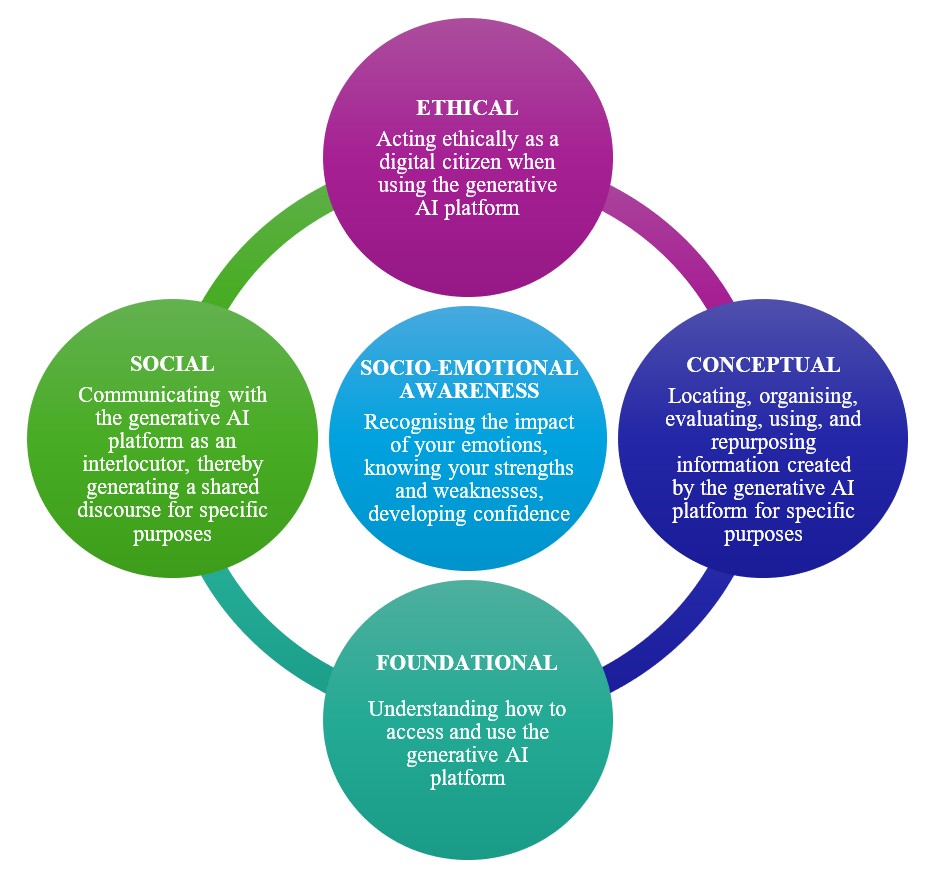
The integration of Generative AI into academic life appears to be a significant moment for university libraries. As trusted guides in the information ecosystem, librarians are positioned to help researchers explore this new terrain, but this transition requires developing a fresh set of skills.

Training your library team on AI-powered research tools could move beyond technical instruction to focus on critical thinking, ethical understanding, and human judgment.

Here is a proposed framework for a training program, organised by the new competencies your team might need to explore.

Foundational: Understanding Access and Use

This initial module establishes a baseline understanding of the technology itself.

  • Accessing the Platform: Teach the technical steps for using the institution’s approved AI tools, including authentication, subscription models, and any specific interfaces (e.g., vendor-integrated AI features in academic databases, institutional LLMs, etc.).
  • Core Mechanics: Explain what a Generative AI platform (like a Large Language Model) is and, crucially, what it is not. Cover foundational concepts like:
    • Training Data: Familiarise staff with how to access the institution’s chosen AI tools, noting any specific authentication requirements or limitations tied to vendor-integrated AI features in academic databases.
    • Prompting Basics: Introduce basic prompt engineering, the art of crafting effective, clear queries to get useful outputs.
    • Hallucinations: Directly address the concept of “hallucinations,” or factually incorrect/fabricated outputs and citations, and emphasise the need for human verification.

Conceptual: Critical Evaluation and Information Management

This module focuses on the librarian’s core competency: evaluating information in a new context.

  • Locating and Organising: Train staff on how to use AI tools for practical, time-saving tasks, such as:
    • Generating keywords for better traditional database searches.
    • Summarising long articles to quickly grasp the core argument.
    • Identifying common themes across a set of resources.
  • Evaluating Information: This is perhaps the most critical skill. Teach a new layer of critical information literacy:
    • Source Verification: Always cross-check AI-generated citations, summaries, and facts against reliable, academic sources (library databases, peer-reviewed journals).
    • Bias Identification: Examine AI outputs for subtle biases, especially those related to algorithmic bias in the training data, and discuss how to mitigate this when consulting with researchers.
  • Using and Repurposing: Demonstrate how AI-generated material should be treated—as a raw output that must be heavily edited, critiqued, and cited, not as a final product.

Social: Communicating with AI as an Interlocutor

The quality of AI output is often dependent on the user’s conversational ability. This module suggests treating the AI platform as a possible partner in a dialogue.

  • Advanced Prompt Engineering: Move beyond basic queries to teach techniques for generating nuanced, high-quality results:
    • Assigning the AI a role (such as a ‘sceptical editor’ or ‘historical analyst’) to potentially shape a more nuanced response.
    • Practising iterative conversation, where librarians refine an output by providing feedback and further instructions, treating the interaction as an ongoing intellectual exchange.
  • Shared Understanding: Practise using the platform to help users frame their research questions more effectively. Librarians can guide researchers in using the AI to clarify a vague topic or map out a conceptual framework, turning the tool into a catalyst for deeper thought rather than a final answer generator.

Socio-Emotional Awareness: Recognising Impact and Building Confidence

This module addresses the human factor, building resilience and confidence

  • Recognising the Impact of Emotions: Acknowledge the possibility of emotional responses, such as uncertainty about shifting professional roles or discomfort with rapid technological change, and facilitate a safe space for dialogue.
  • Knowing Strengths and Weaknesses: Reinforce the unique, human-centric value of the librarian: critical thinking, contextualising information, ethical judgment, and deep disciplinary knowledge, skills that AI cannot replicate. The AI could be seen as a means to automate lower-level tasks, allowing librarians to focus on high-value consultation.
  • Developing Confidence: Implement hands-on, low-stakes practice sessions using real-world research scenarios. Confidence grows from successful interaction, not just theoretical knowledge. Encourage experimentation and a “fail-forward” mentality.

Ethical: Acting Ethically as a Digital Citizen

Ethical use is the cornerstone of responsible AI adoption in academia. Librarians must be the primary educators on responsible usage.

  • Transparency and Disclosure: Discuss the importance of transparency when utilizing AI. Review institutional and journal guidelines that may require students and faculty to disclose how and when AI was used in their work, and offer guidance on how to properly cite these tools.
  • Data Privacy and Security: Review the potential risks associated with uploading unpublished, proprietary, or personally identifiable information (PII) to public AI services. Establish and enforce clear library policies on what data should never be shared with external tools.
  • Copyright and Intellectual Property (IP): Discuss the murky legal landscape of AI-generated content and IP. Emphasise that AI models are often trained on copyrighted material and that users are responsible for ensuring their outputs do not infringe on existing copyrights. Advocate for using library-licensed, trusted-source AI tools whenever possible.
  • Combating Misinformation: Position the librarian as the essential arbiter against the spread of AI-generated misinformation. Training should include spotting common AI red flags, teaching users how to think sceptically, and promoting the library’s curated, authoritative resources as the gold standard.
Categories
en Uncategorized

Digital Information Literacy Guidelines for Academic Libraries

Information literacy is the skill of finding, evaluating, and using information effectively. Data literacy is the skill of understanding numbers and datasets, reading charts, checking how data was collected, and spotting mistakes. Critical thinking is the skill of analysing information, questioning assumptions, and making sound judgments. With so many digital tools today, students and researchers need all three skills, not just to find information, but also to make sense of it and communicate it clearly.

Why Academic Libraries Should Offer Literacy Programs

Let’s face it: research can be overwhelming. Over 5 million research papers are published every year. This information overload means researchers spend 25-30%1 of their time finding and reviewing academic literature, according to the International Study: Perceptions and Behavior of Researchers. Predatory journals, low-quality datasets, and confusing search results can make learning stressful. Libraries are more than book storage, they’re a place to build practical skills. Programs that teach information and data literacy help students think critically, save time, and feel more confident with research.

Key Skills Students, Researchers, and Librarians Need

Finding and Using Scholarly Content

Knowing how to search a database efficiently is a big deal. Students should learn how to use filters, Boolean logic, subject headings and, of course, intelligent search. They should also know the difference between journal articles, conference papers, and open-access resources.

Evaluating Sources and Data

Not all information is equal. Programs should teach students how to check if sources are reliable, understand peer review, and spot bias in datasets. A few practical techniques, like cross-checking sources or looking for data provenance, can make research much stronger.

Managing Information Ethically

Citing sources properly, avoiding plagiarism, and respecting copyright are essentials. Tools like Zotero or Mendeley help keep references organised, so students spend less time managing files and more time on research.

Sharing Findings Clearly

Communicating is sharing, and sharing is caring. It’s one thing to collect information; it’s another to communicate it. Using infographics, slides, or storytelling techniques to make research more memorable. Ultimately, clear communication ensures that the work they’ve done can be understood, used, and appreciated by others.

Frameworks That Guide Literacy Programs

  • ACRL Framework: Provides six key concepts for teaching information literacy.
  • EU DigComp / DigCompEdu: Covers digital skills for students and educators.
  • Data Literacy Project: Helps students understand how to work with datasets, complementing traditional research skills.

These frameworks help librarians structure programs so students get consistent, practical guidance.

Steps to Build a Digital Literacy Program

  1. Audit Campus Needs: Talk to students and faculty, see what resources exist, and find gaps.
  2. Set Learning Goals: Decide what students should be able to do at the end, and make goals measurable.
  3. Select Content and Tools: Choose databases, software, and datasets that fit the library’s budget and tech setup.
  4. Create Short, Modular Lessons: Break skills into manageable pieces that build on each other.
  5. Launch and Improve: Introduce the program, gather feedback, and adjust lessons based on what works and what doesn’t.

Teaching Strategies and Online Tools

Flipped and Embedded Instruction

  • Students watch a short video about search techniques at home, then practice in class.
  • A librarian might join a research methods class, helping students build search strings live.
  • Pre-class quizzes on topics like peer review versus predatory journals prepare students for hands-on exercises.

Short Videos and Tutorials

Quick videos (2–5 minutes) can teach one skill at a time, like citation management, evaluating sources, or basic data visualisation. Include captions, transcripts, and small practice exercises to reinforce learning.

AI Summaries and Chatbots

AI tools can summarise articles, suggest keywords, highlight main points, and even draft bibliographies. But they aren’t perfect, they can make mistakes, miss nuances, or misread complex tables. Human oversight is still important.

Free Resources and Open Datasets

Students can practice with free databases and datasets like DOAJ, arXiv, Kaggle, or Zenodo. Using one of the open-access resources keeps programs affordable while providing real-world examples.

Checking if Students Are Learning

  • Before and After Assessments: Simple quizzes or tasks to see how skills improve.
  • Performance Rubrics: Compare beginner, developing, and advanced levels in searching, evaluating, and presenting data.
  • Analytics: Track which videos or tools students use most to improve future lessons.

Working With Faculty

  • Embedded Workshops: Librarians teach skills directly tied to assignments.
  • Joint Assignments: Faculty design research projects that naturally teach literacy skills.
  • Faculty Training: Show instructors how to integrate digital literacy into their courses.

Tackling Challenges

  • Staff Training: Librarians may need extra help with data tools. Peer mentoring and workshops work well.
  • Limited Budgets: Open access tools, collaborative licensing, and free platforms help make programs feasible.
  • Distance Learners: Make videos and tutorials accessible anytime, account for different time zones and internet access.

Looking Ahead

AI, open science, and global collaboration are changing research. AI can personalise learning, but it still needs oversight. Open science and FAIR data principles (set of guidelines for making research data Findable, Accessible, Interoperable, and Reusable to both humans and machines) encourage transparency and reproducibility. Libraries can also connect with international partners to share resources and best practices.

FAQs

How long does a program take to launch?
Basic services can start in six months; full programs usually take 1–2 years.

Do humanities students need data skills? 
Yes, focus is more on qualitative analysis and digital humanities tools.


Where can libraries find free datasets? 
Government repositories, Kaggle, Zenodo, and university archives.


Can small libraries succeed without data specialists?
Yes, faculty collaboration and online resources can cover most needs.

Categories
en Uncategorized

From Boolean to Intelligent Search: A Librarian’s Guide to Smarter Information Retrieval

As a librarian, you’ve always been the person people turn to when they need help finding answers. But the way we search for information is changing fast. Databases are growing, new tools keep appearing, and students expect instant results. Only then will you know the true benefit of AI for libraries, to help you make sense of it all.

From Boolean to Intelligent Search

Traditional search is still part of everyday library work. It depends on logic and structure, keywords, operators, and carefully built queries. But AI adds something new. It doesn’t just look for words; it tries to understand what someone means.

If a researcher searches for “climate change effects on migration,” an AI-powered tool doesn’t just pull results with those exact words. It also looks for studies about environmental displacement, regional challenges, and social impacts.

This means you can spend less time teaching people how to “speak database” and more time helping them understand the research they find.

The Evolution of Library Search

Traditional search engines focus on matching keywords, which often leads to long lists of results. With AI, search tools can now read queries in natural language, just the way people ask questions, and still find accurate, relevant material.

Natural language processing (NLP) and machine learning (ML) make it possible for search systems to connect related ideas, even when the exact words aren’t used. Features like semantic search and vector databases help AI recognise patterns and suggest other useful directions for exploration.

Examples of AI Tools Librarians Can Use

Tool / PlatformWhat It DoesWhy It Helps Librarians
ZendyA platform that combines literature discovery, AI summaries, keyphrase highlighting, and PDF analysisHelps librarians and researchers access, read, and understand academic papers more easily
ConsensusAn AI-powered academic search engine that summarises findings from peer-reviewed studiesHelps with literature reviews and citation management
Ex Libris PrimoUses AI to support discovery and manage metadataImproves record accuracy and helps users find what they need faster
MeilisearchA fast, flexible search engine that uses NLPMakes it easier to search large databases efficiently

The Ethics of Intelligent Search

Algorithms influence what users see and what they might miss. That’s why your role is so important. You can help users question why certain results appear on top, encourage critical thinking, and remind them that algorithms are not neutral.

Digital literacy today isn’t just about knowing how to search, it’s about understanding how the search works.

In Conclusion

AI tools for librarians are becoming easier to use and more helpful every day. Some platforms now include features like summarisation, citation analysis, and even plans to highlight retracted papers, something Zendy is working toward.

Trying out these tools can make your work smoother: faster reference responses, smarter cataloguing, and better guidance for researchers who often feel lost in the flood of information.

AI isn’t replacing your expertise, it’s helping you use it in new ways. And that’s what makes this moment exciting for librarians everywhere.

Categories
en Uncategorized

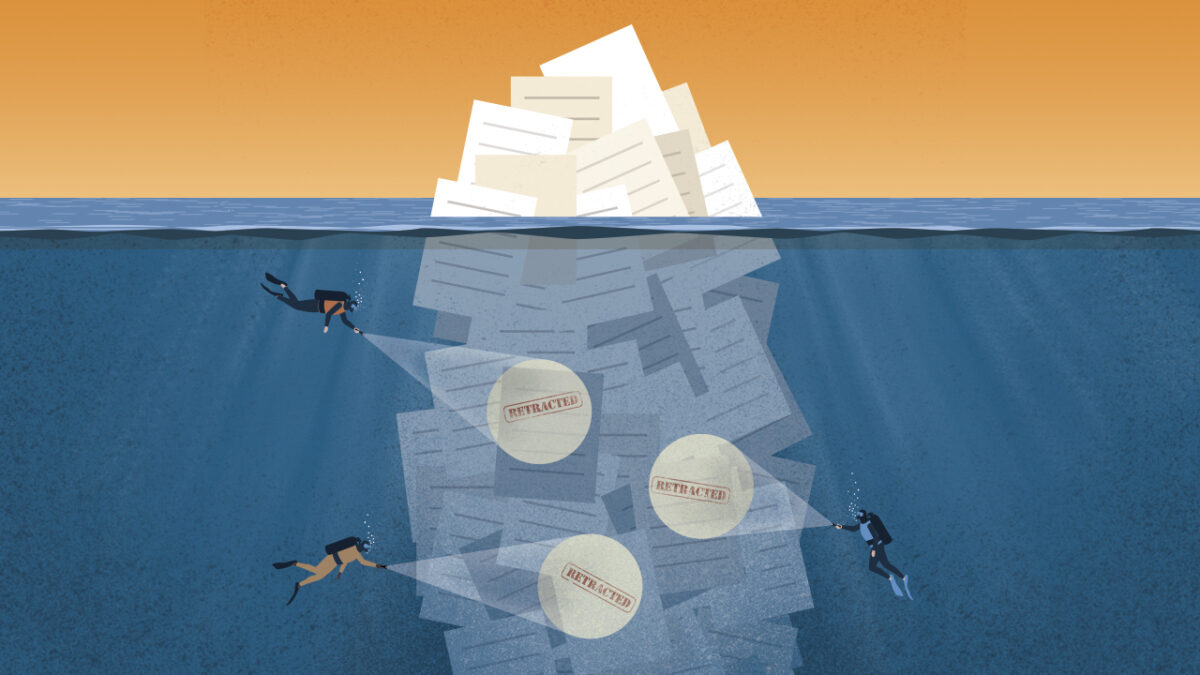
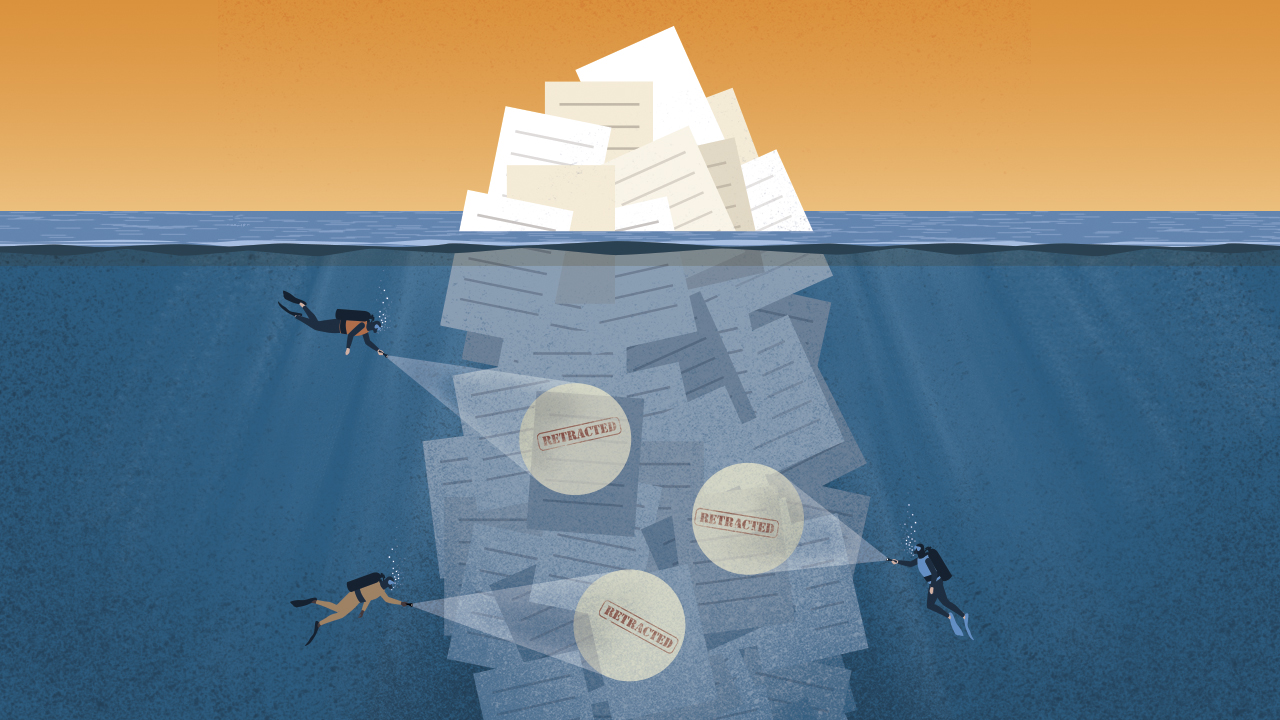
Why AI like ChatGPT still quotes retracted papers?

retracted studies

AI models like ChatGPT are trained on massive datasets collected at specific moments in time, which means they lack awareness of papers retracted after their training cutoff. When a scientific paper gets retracted, whether due to errors, fraud, or ethical violations, most AI systems continue referencing it as if nothing happened. This creates a troubling scenario where researchers using AI assistants might unknowingly build their work on discredited foundations.

In other words: retracted papers are the academic world’s way of saying “we got this wrong, please disregard.” Yet the AI tools designed to help us navigate research faster often can’t tell the difference between solid science and work that’s been officially debunked.

ChatGPT and other assistants tested

Recent studies examined how popular AI research tools handle retracted papers, and the results were concerning. Researchers tested ChatGPT, Google’s Gemini, and similar language models by asking them about known retracted papers. In many cases, they not only failed to flag the retractions but actively praised the withdrawn studies.

One investigation found that ChatGPT referenced retracted cancer imaging research without any warning to users, presenting the flawed findings as credible. The problem extends beyond chatbots to AI-powered literature review tools that researchers increasingly rely on for efficiency.

Common failure scenarios

The risks show up across different domains, each with its own consequences:

  • Medical guidance: Healthcare professionals consulting AI for clinical information might receive recommendations based on studies withdrawn for data fabrication or patient safety concerns
  • Literature reviews: Academic researchers face citation issues when AI assistants suggest retracted papers, damaging credibility and delaying peer review
  • Policy decisions: Institutional leaders making evidence-based choices might rely on AI-summarised research without realising the underlying studies have been retracted

A doctor asking about treatment protocols could unknowingly follow advice rooted in discredited research. Meanwhile, detecting retracted citations manually across hundreds of references proves nearly impossible for most researchers.

How Often Retractions Slip Into AI Training Data

The scale of retracted papers entering AI systems is larger than most people realise. Crossref, the scholarly metadata registry that tracks digital object identifiers (DOIs) for academic publications, reports thousands of retraction notices annually. Yet many AI models were trained on datasets harvested years ago, capturing papers before retraction notices appeared.

Here’s where timing becomes critical. A paper published in 2020 and included in an AI training dataset that same year might get retracted in 2023. If the model hasn’t been retrained with updated data, it remains oblivious to the retraction. Some popular language models go years between major training updates, meaning their knowledge of the research landscape grows increasingly outdated.

Lag between retraction and model update

Training Large Language Models requires enormous computational resources and time, which explains why most AI companies don’t continuously update their systems. Even when retraining occurs, the process of identifying and removing retracted papers from massive datasets presents technical challenges that many organisations haven’t prioritised solving.

The result is a growing gap between the current state of scientific knowledge and what AI assistants “know.” You might think AI systems could simply check retraction databases in real-time before responding, but most don’t. Instead, they generate responses based solely on their static training data, unaware that some information has been invalidated.

Risks of Citing Retracted Papers in Practice

The consequences of AI-recommended retracted papers extend beyond embarrassment. When flawed research influences decisions, the ripple effects can be substantial and long-lasting.

Clinical decision errors

Healthcare providers increasingly turn to AI tools for quick access to medical literature, especially when facing unfamiliar conditions or emerging treatments. If an AI assistant recommends a retracted study on drug efficacy or surgical techniques, clinicians might implement approaches that have been proven harmful or ineffective. The 2020 hydroxychloroquine controversy illustrated how quickly questionable research spreads. Imagine that dynamic accelerated by AI systems that can’t distinguish between valid and retracted papers.

Policy and funding implications

Government agencies and research institutions often use AI tools to synthesise large bodies of literature when making funding decisions or setting research priorities. Basing these high-stakes choices on retracted work wastes resources and potentially misdirects entire fields of inquiry. A withdrawn climate study or economic analysis could influence policy for years before anyone discovers the AI-assisted review included discredited research.

Academic reputation damage

For individual researchers, citing retracted papers carries professional consequences. Journals may reject manuscripts, tenure committees question research rigour, and collaborators lose confidence. While honest mistakes happen, the frequency of such errors increases when researchers rely on AI tools that lack retraction awareness, and the responsibility still falls on the researcher, not the AI.

Why Language Models Miss Retraction Signals

The technical architecture of most AI research assistants makes them inherently vulnerable to the retraction problem. Understanding why helps explain what solutions might actually work.

Corpus quality controls lacking

AI models learn from their training corpus, the massive collection of text they analyse during development. Most organisations building these models prioritise breadth over curation, scraping academic databases, preprint servers, and publisher websites without rigorous quality checks.

The assumption is that more data produces better models, but this approach treats all papers equally regardless of retraction status. Even when training data includes retraction notices, the AI might not recognise them as signals to discount the paper’s content. A retraction notice is just another piece of text unless the model has been specifically trained to understand its significance.

Sparse or inconsistent metadata

Publishers handle retractions differently, creating inconsistencies that confuse automated systems:

  • Some journals add “RETRACTED” to article titles
  • Others publish separate retraction notices
  • A few quietly remove papers entirely

This lack of standardisation means AI systems trained to recognise one retraction format might miss others completely. Metadata، the structured information describing each paper, often fails to consistently flag retraction status across databases. A paper retracted in PubMed might still appear without warning in other indexes that AI training pipelines access.

Hallucination and overconfidence

AI hallucination occurs when models generate plausible-sounding but false information, and it exacerbates the retraction problem. Even if a model has no information about a topic, it might confidently fabricate citations or misremember details from its training data. This overconfidence means AI assistants rarely express uncertainty about the papers they recommend, leaving users with no indication that additional verification is needed.

Real-Time Retraction Data Sources Researchers Should Trust

While AI tools struggle with retractions, several authoritative databases exist for manual verification. Researchers concerned about citation integrity can cross-reference their sources against these resources.

Retraction Watch Database

Retraction Watch operates as an independent watchdog, tracking retractions across all academic disciplines and publishers. Their freely accessible database includes detailed explanations of why papers were withdrawn, from honest error to fraud. The organisation’s blog also provides context about patterns in retractions and systemic issues in scholarly publishing.

Crossref metadata service

Crossref maintains the infrastructure that assigns DOIs to scholarly works, and publishers report retractions through this system. While coverage depends on publishers properly flagging retractions, Crossref offers a comprehensive view across multiple disciplines and publication types. Their API allows developers to build tools that automatically check retraction status, a capability that forward-thinking platforms are beginning to implement.

PubMed retracted publication tag

For medical and life sciences research, PubMed provides reliable retraction flagging with daily updates. The National Library of Medicine maintains this database with rigorous quality control, ensuring retracted papers receive prominent warning labels. However, this coverage is limited to biomedical literature, leaving researchers in other fields without equivalent resources.

DatabaseCoverageUpdate SpeedAccess
Retraction WatchAll disciplinesReal-timeFree
CrossrefPublisher-reportedVariableFree API
PubMedMedical/life sciencesDailyFree


Responsible AI Starts with Licensing

When AI systems access research papers, articles, or datasets, authors and publishers have legal and ethical rights that need protection. Ignoring these rights can undermine the sustainability of the research ecosystem and diminish trust between researchers and technology providers.

One of the biggest reasons AI tools get it wrong is that they often cite retracted papers as if they’re still valid. When an article is retracted, e.g. due to peer review process not being conducted properly or failing to meet established standards, most AI systems don’t know, it simply remains part of their training data. This is where licensing plays a crucial role. Licensed data ensures that AI systems are connected to the right sources, continuously updated with accurate, publisher-verified information. It’s the foundation for what platforms like Zendy aim to achieve: making sure the content is clean and trustworthy. 

Licensing ensures that content is used responsibly. Proper agreements between AI companies and copyright holders allow AI systems to access material legally while providing attribution and, when appropriate, compensation. This is especially important when AI tools generate insights or summaries that are distributed at scale, potentially creating value for commercial platforms without benefiting the sources of the content.

in conclusion, consent-driven licensing helps build trust. Publishers and authors can choose whether and how their work is incorporated into AI systems, ensuring that content is included only when rights are respected. Advanced AI platforms, such as Zendy, can even track which licensed sources contributed to a particular output, providing accountability and a foundation for equitable revenue sharing.

Categories
en

5 Tools Every Librarian Should Know in 2025

ai for libraries

The role of librarians has always been about connecting people with knowledge. But in 2025, with so much information floating around online, the challenge isn’t access, it’s sorting through the noise and finding what really matters. This is where AI for libraries is starting to make a difference. Here are five that are worth keeping in your back pocket this year.

1. Zendy

Zendy is a one-stop AI-powered research library that blends open access with subscription-based resources. Instead of juggling multiple platforms, librarians can point students and researchers to one place where they’ll find academic articles, reports, and AI tools to help with research discovery and literature review. With its growing use of AI for libraries, Zendy makes it easier to summarise research, highlight key ideas, and support literature reviews without adding to the librarian’s workload.

2. LibGuides

Still one of the most practical tools for librarians, LibGuides makes it easy to create tailored resource guides for courses, programs, or specific assignments. Whether you’re curating resources for first-year students or putting together a subject guide for advanced research, it helps librarians stay organised while keeping information accessible to learners.

3. OpenRefine

Cleaning up messy data is nobody’s favourite job, but it’s a reality when working with bibliographic records or digital archives. OpenRefine is like a spreadsheet, but with superpowers, it can quickly detect duplicates, fix formatting issues, and make large datasets more manageable. For librarians working in cataloguing or digital collections, it saves hours of tedious work.

4. PressReader

Library patrons aren’t just looking for academic content; they often want newspapers, magazines, and general reading material too. PressReader gives libraries a simple way to provide access to thousands of publications from around the world. It’s especially valuable in public libraries or institutions with international communities.

5. OCLC WorldShare

Managing collections and sharing resources across institutions is a constant task. OCLC WorldShare helps libraries handle cataloguing, interlibrary loans, and metadata management. It’s not flashy, but it makes collaboration between libraries smoother and ensures that resources don’t sit unused when another community could benefit from them.

Final thought

The tools above aren’t just about technology, they’re about making everyday library work more practical. Whether it’s curating resources with Zendy, cleaning data with OpenRefine, or sharing collections through WorldShare, these platforms help librarians do what they do best: guide people toward knowledge that matters.

Categories
en

Balancing AI Efficiency with Human Expertise in Libraries

AI in libraries

AI in libraries is making some tasks quicker and less repetitive. However, even with these advances, there’s something irreplaceable about a librarian’s judgment and care. The real question isn’t whether AI will take over libraries, it’s how both AI and librarians can work side by side.

How AI Helps in Libraries

According to Clarivate Pulse of the Library 2025 survey, among 2,000 academic library professionals globally, many said they don’t have enough time or budget to learn new tools or skills, a challenge made even harder as global digital content is projected to double every two years.

Here’s where AI tools for librarians prove useful:

  • Cataloguing: AI can scan metadata and suggest subject tags in minutes.
  • Search: Smarter search systems help students and researchers find relevant materials without digging through dozens of irrelevant results.
  • Day-to-day tasks: Think overdue notices, compiling basic reading lists, or identifying key sources and trends to support literature reviews. This is where library automation with AI comes in handy.

Instead of replacing people, these tools free up time. A librarian who doesn’t have to spend hours sorting through data can focus on supporting students, curating collections, analysing usage statistics to make informed decisions or tracking resource usage against budgets.

Where Human Expertise Still Matters

AI is fast, but it’s not thoughtful. A student asking, “I’m researching migration patterns in 19th-century Europe, where do I start?” gets much more from a librarian than from a search algorithm. Librarians bring context, empathy, and critical thinking that machines can’t replicate.

This is why human-AI collaboration in libraries makes sense. AI takes care of the routine. Humans bring the nuance. Together, they cover ground neither could manage alone.

Finding the Balance

So how do libraries get this balance right? A few ideas:

  1. Think of AI as a helper – not a replacement for staff.
  2. Invest in training – librarians need to feel confident using AI tools and knowing when not to rely on them.
  3. Keep the focus on people – the goal isn’t efficiency for its own sake, it’s about better service for students, researchers, and communities.

Final Thoughts

By using AI to handle routine administrative tasks like cataloguing, managing records, or tracking resource usage, librarians free up time to focus on the part of the job that drew them to this profession in the first place: supporting researchers and students, curating meaningful collections, and fostering learning. Combining the efficiency of AI in libraries with the expertise of librarians creates a future where technology supports the human side of education.

Categories
en

How AI in Higher Education Is Helping Libraries Support Research

AI in Higher Education

Libraries have always been at the centre of knowledge in higher education. Beyond curating collections, librarians guide researchers and students through complex databases, teach research skills, and help faculty navigate publishing requirements. They also play a key role in managing institutional resources, preserving archives, and ensuring equitable access to information. These days, libraries are facing new challenges: huge amounts of digital content, tighter budgets, and more demand for remote access. In this environment, AI in higher education is starting to make a real difference.

How AI Makes Life Easier for Librarians

Improving Discovery

AI-powered search tools don’t just look for keywords, they can understand the context of a query. That means students and researchers can find related work they might otherwise miss. It’s like having an extra set of eyes to point them toward useful sources.

Helping with Curation

AI can go through thousands of articles and highlight the ones most relevant to a specific course, project, or research topic. For example, a librarian preparing a reading list for a history class can save hours by letting AI suggest the most relevant papers or reports.

Supporting Remote Access

Students, researchers and faculty aren’t always on campus. AI can summarise long articles, translate content, or adjust resources for different reading levels. This makes it easier for people to get the information they need, even from home.

Working Within Budgets

Subscriptions remain a major expense for libraries, and ongoing budget cuts are forcing many academic institutions to make difficult choices about which resources to keep or cancel. For example, recent surveys show that around 73% of UK higher education libraries are making budget cuts this year, sometimes slashing up to 30% of their overall budgets, and collectively spending £51 million less than the previous year. This trend is not limited to the UK, universities in the U.S. and elsewhere are also reducing library funding, which has dropped by nearly 20% per student over recent years. Even top institutions like Princeton have cut library hours and student staffing to save on costs.

Subscriptions can be expensive, and libraries often have to make tough choices. AI tools that work across large collections help libraries give students and researchers more access without adding extra subscriptions.

Trusted Content Still Matters

AI is helpful, but the resources behind it are just as important. Librarians care about trusted, peer-reviewed, and varied sources.

Librarians and AI: A Partnership

AI isn’t replacing librarians. Instead, it supports the work they already do. Librarians are the ones who guide researchers, check the quality of sources, and teach information skills. By using AI tools, librarians can make research easier for students, researchers and faculty, and they can help their institutions make the most of the resources they have.

Final Thoughts

AI in higher education is making it easier for libraries to support students and faculty, but librarians are still at the centre of the process. By using AI tools alongside strong content collections, libraries can save time, offer more resources, and help researchers find exactly what they need. With the right AI support, research becomes easier to navigate and more accessible without overcomplicating the process.

Categories
en Uncategorized

Best AI Productivity Tools for Students and Researchers

AI productivity tools are digital platforms that use artificial intelligence to help researchers work more efficiently. Unlike traditional software, these tools use algorithms and machine learning to automate routine tasks, process large amounts of information, and generate insights.

Traditional productivity apps rely on manual input. AI-powered tools can learn from user habits, interpret natural language, and offer smart suggestions. For researchers, this means tasks like transcription, organisation, and project management happen faster with less effort.

The benefits of AI-powered productivity tools for students to enhance academic workflows include:

  • Time efficiency: Automated transcription and summarisation
  • Accuracy: Reduced manual errors in data processing
  • Organisation: Smart categorisation of notes, tasks, and references
  • Collaboration: Real-time sharing and editing of documents and projects

Quick comparison of Otter.AI, Bit.ai, Notion, and Todoist

AI productivity tools offer different features for research, writing, collaboration, and task management. Understanding which tool handles which function helps you choose the right combination.

ToolTranscriptionDocument CollaborationTask ManagementKnowledge Organization
Otter.AIYesLimited (shared notes)NoKeyword search, highlights
Bit.aiNoYesLimitedCentralized workspace
NotionNoYesYesDatabases, linked notes
TodoistNoLimited (shared tasks)YesProject lists

Each tool provides a free version, making them accessible to students and researchers who want to try basic features. Advanced features for collaboration, automation, and AI-powered suggestions are available in paid plans.

Best-fit scenarios for each tool:

  • Otter.AI: Recording and transcribing interviews, lectures, or meetings
  • Bit.ai: Collaborative writing, team documentation, and organising research materials
  • Notion: Managing literature reviews, creating structured research databases, and planning projects
  • Todoist: Tracking deadlines, managing tasks for long-term research projects

Where Otter.AI fits in the research workflow

Otter.AI uses speech-to-text technology to convert spoken words into written text. In research, it captures and documents conversations, meetings, interviews, and lectures automatically. The tool processes audio in real time and generates a digital transcript that can be reviewed and edited after the session.

AI Productivity Tools for Researchers

The platform provides real-time transcription, converting speech into text as it happens. This works during interviews or classroom lectures, recording and transcribing spoken content simultaneously. The tool identifies and labels different speakers, helping track who is talking in group settings. Transcription accuracy depends on audio quality, background noise, and speaker clarity.

Once a transcript is created, it becomes a searchable text document. You can search for specific phrases, topics, or keywords within the transcript to locate information quickly. The platform highlights keywords or important sections, making it easier to analyse large volumes of qualitative data. This searchable database supports reviewing, coding, and referencing spoken information during research analysis.

How Bit.ai streamlines collaborative writing

Bit.ai is a document collaboration platform that uses AI to help research teams and co-authors work together on academic projects. It creates a single online space for groups to create, edit, and organise research documents.

AI Productivity Tools for Researchers

The platform allows users to embed rich media such as images, videos, and interactive charts directly into documents. So as a team, you can edit the same document simultaneously, and changes appear instantly for everyone. AI features suggest content improvements, recommend citations, and help organise ideas as users write.

Bit.ai provides a centralised workspace where teams can store and arrange research materials, references, and notes. Users create folders for different projects or topics, making it easier to locate specific files and information. All team members can access shared resources and contribute to the collective knowledge base.

Managing projects and deadlines with Todoist AI

Todoist AI handles project management for research workflows that include multiple deadlines, contributors, and project phases. The platform helps with planning and tracking ongoing or long-term academic projects, such as group research papers, lab work, or thesis development.

AI Productivity Tools for Researchers

The AI task management tools use AI to rank tasks according to their deadlines, dependencies, and importance within each stage of a research project. The system analyses which tasks are most urgent, identifies which activities rely on others being completed first, and adjusts priorities as new information is added or project phases change.

Smart scheduling features include intelligent allocation of time blocks for each task based on deadlines and workload. The platform generates automated reminders for important milestones, such as draft submissions, experiment dates, or meetings. When timeline changes occur, Todoist AI updates the schedule and sends notifications to keep team members aware of upcoming deadlines.

Organising knowledge bases in Notion AI

Notion AI combines note-taking, databases, and task management in one platform. Researchers use Notion AI to organise articles, research notes, and project documents in a single, structured environment. This tool supports literature management and research organisation for individuals and teams.

AI Productivity Tools for Researchers

The AI processes and summarises text from research notes, meeting minutes, or uploaded literature. It generates concise overviews of long passages and extracts main ideas from academic content. The system answers user questions by searching through stored notes and documents, providing relevant information based on previous entries.

Notion AI offers database templates designed for academic workflows:

  • Literature review templates: Fields for citation details, summaries, and key findings
  • Data collection templates: Record variables, sources, and results
  • Research planning templates: Structure timelines, objectives, and progress trackers

Each template can be customised to meet the requirements of a specific research process.

Integrating tools with reference managers and libraries

Best AI tools for students often work together with reference managers and digital research libraries. This setup helps researchers organise sources and manage citations more efficiently. Many tools support direct or indirect connections to widely used academic platforms.

Zotero and Mendeley are reference management systems that collect, organise, and cite academic sources. Both platforms have integration options with AI productivity tools. Some document collaboration platforms and note-taking apps allow users to export references in formats compatible with these reference managers. Browser plugins and word processor add-ons let users insert citations and bibliographies into research documents.

Zendy’s AI-powered research library works alongside productivity and reference management tools. Users can discover and access full-text articles through Zendy, then export citations to reference managers. Zendy’s platform supports AI summarisation, key phrase highlighting, and organised reading lists, which streamline literature reviews and project planning. When used with collaborative writing or task management tools, Zendy provides a central source for reliable academic content and citation data.

Choosing the right tool mix for your research

Selecting AI productivity tools for students and research involves matching tool features to specific project requirements. The best combination depends on research objectives, group size, and preferred working methods. Each tool offers different functions, so understanding your workflow is the first step.

Assessment criteria include research type, collaboration needs, and technical requirements. Qualitative research involving interviews and discussions often uses transcription tools like Otter.AI, while quantitative projects may focus on organisation and project management. Research conducted in teams benefits from document collaboration platforms that support shared editing and centralised knowledge.

Technical requirements include compatibility with institutional systems, device support, integration with reference managers, and data privacy standards. Consider whether the tool works on preferred devices and integrates with other software used for citations or data storage.

Many AI productivity tools offer free versions with core features suitable for individual students or small projects. Larger teams or advanced projects may use paid plans that unlock collaboration, automation, or additional storage. Institutional licenses sometimes provide access to premium features at no individual cost.

Implementation tips for secure compliant use

Academic and institutional environments require careful management of data privacy and security when using AI productivity tools. Each tool interacts with research data differently, so understanding how information is handled protects both individual and institutional interests.

GDPR compliance applies to any tool that processes or stores personal information of individuals in the European Union. Institutional data policies often include guidelines on where research data may be stored, who can access it, and how long it can be retained. Secure handling involves using encrypted connections, selecting tools with end-to-end encryption, and ensuring sensitive files are shared only within approved platforms.

Introducing AI tools to research teams involves several steps:

  • Testing phase: Select a small group to test the tool and provide feedback
  • Documentation: Create clear guidelines for using tools within research workflows
  • Training: Help team members understand secure and responsible usage
  • Role establishment: Set up administrators, data managers, and regular users
  • Regular reviews: Assess whether tools continue to meet privacy requirements

Discover Zendy for limitless research access

Zendy, AI AI-powered research library, acts as a central research hub that connects with AI productivity tools used in academic work. The platform provides access to scholarly articles, journals, and academic resources across disciplines.

Features such as ZAIA, AI assistant for research, AI-powered summarisation, key phrase highlighting, and organised reading lists help manage literature and support research projects. You can export citations to reference managers and create structured workflows for academic tasks. 

For researchers looking to integrate comprehensive literature access with their productivity workflow, Zendy’s AI-powered research library provides the foundation for efficient academic research.

FAQs about AI productivity tools for students and researchers

How do AI transcription tools handle sensitive interview recordings?

Most AI productivity tools use encryption and privacy controls to protect sensitive recordings. Researchers need to verify compliance with institutional data policies and obtain participant consent when managing such data.

Can Otter AI transcribe interviews without internet connection?

Otter.AI requires internet connection for real-time transcription. Some features work offline with limited functionality, but full transcription capabilities need online access for processing.

Which productivity tool works best with Zotero and Mendeley?

Notion provides flexible integration through its API, allowing various connections with citation management software. Bit.ai offers direct export features for popular reference managers like Zotero and Mendeley.

Do these AI tools support research content in languages other than English?

Language support varies by tool. Otter AI includes multiple language transcription capabilities, while Notion AI processes text in various languages for research content management.